From spreadsheets to a sales platform — built through five rebuilds.
As the sales team grew from one person to a full team, I rebuilt the operations system five times — from manual tracking to automated deal management, SMS confirmations, and a real-time analytics dashboard.
A sales system that broke every time the business grew
In 2024, the sales process was built around the founder as the sole salesperson. Bookings went through her Calendly, she manually reached out before calls to nurture leads, and she tracked everything herself. It worked — until we added salespeople.
Every expansion broke the system. Adding a second salesperson meant switching Calendly to round-robin, which broke every downstream automation. Tracking leads in Google Sheets worked for dozens of contacts but collapsed at hundreds. We moved to Asana with prepopulated stages, but it was built around specific people, not the role — so it broke when the team changed. We rebuilt again in ActiveCampaign deals to keep all the data in one place, but contacts ended up with multiple deals across multiple pipelines, scattering their data.
Then we tried to automate pre-call nurturing. The sales team needed automated booking confirmation texts via JustCall — a welcome message with event times, reschedule links, and the understanding that while texts were automated, the numbers were tied to real people. We built it on Zapier. It worked until someone needed to cancel or reschedule — reminder texts would still go out for cancelled events, and any change to the Zapier flow would break it for everyone currently inside it.
Each version solved one problem and created two more. The fundamental issue was the same every time: the system wasn't designed to evolve.
Six iterations to get it right
Two systems, one operations layer
Booking Automation Engine
When a prospect books a discovery call through Calendly, the system takes over. A webhook hits the booking engine on Railway, which:
- Checks ActiveCampaign for any existing deals across all pipelines
- Removes scattered deals so the contact has one clean record
- Creates a fresh deal on the booking pipeline — flagging rebooks, cancellations, and history so the sales rep sees context at a glance
- Schedules SMS confirmations through JustCall — timed based on how far out the call is
- Monitors event status — if the prospect cancels or reschedules, scheduled texts are suppressed
- After the call outcome, automatically enrolls the contact into tailored email sequences
The entire system is built as a state machine — every booking moves through defined states (BOOKED → CONFIRM_REQUESTED → CONFIRMED → COMPLETED), with every transition logged for debugging. The sales team's Zapier automations can be modified without affecting the booking flow, because the booking engine is a hard boundary that other processes can't break.
Analytics Dashboard
With the booking automation handling deal management and SMS, the next problem was visibility. The sales team needed to see the full picture — not just their own pipeline, but the entire funnel from first contact to close.
Weekly Pipeline Snapshots
At the start of every week, the sales team gets a complete picture of how the pipeline is performing — total contacts, quiz completions, masterclass attendance, discovery calls booked, purchases made. KPI cards show the numbers at a glance with configurable timeframes (7 days, 14 days, 30 days, 90 days).
One-Click Lead Filtering
Quick filter pills let the team slice the contact list instantly: everyone with a deal, everyone who booked a call, everyone who no-showed, everyone who opted out, everyone with high engagement. Profile-level filters go deeper: quiz completed, masterclass attended, fast leads, filtered by country.
Contact Journey Timeline
Every contact has a unified timeline showing every touchpoint in chronological order — tags added/removed, automations triggered, emails opened, SMS sent and received, calls made, deals created, bookings scheduled. Fifteen event categories from three different data sources merged into one scrollable view.
Conversion Tracking & Funnel
A funnel view shows how prospects move through stages — from first contact through quiz, masterclass, discovery call, to purchase. The team can identify where people drop off and what paths lead to conversion.
Engagement Charts
Stacked bar charts show activity over time — SMS, calls, tags, automations, deals, and opt-outs — for individual contacts or across the pipeline. Clicking a bar drills into that day's events. Opt-out events are flagged in red.
Prospect Details at a Glance
Clicking any contact shows everything the sales team needs before reaching out: contact info, current tags, active automations, deal status, quiz responses, booking form answers, communication history, and engagement stats.
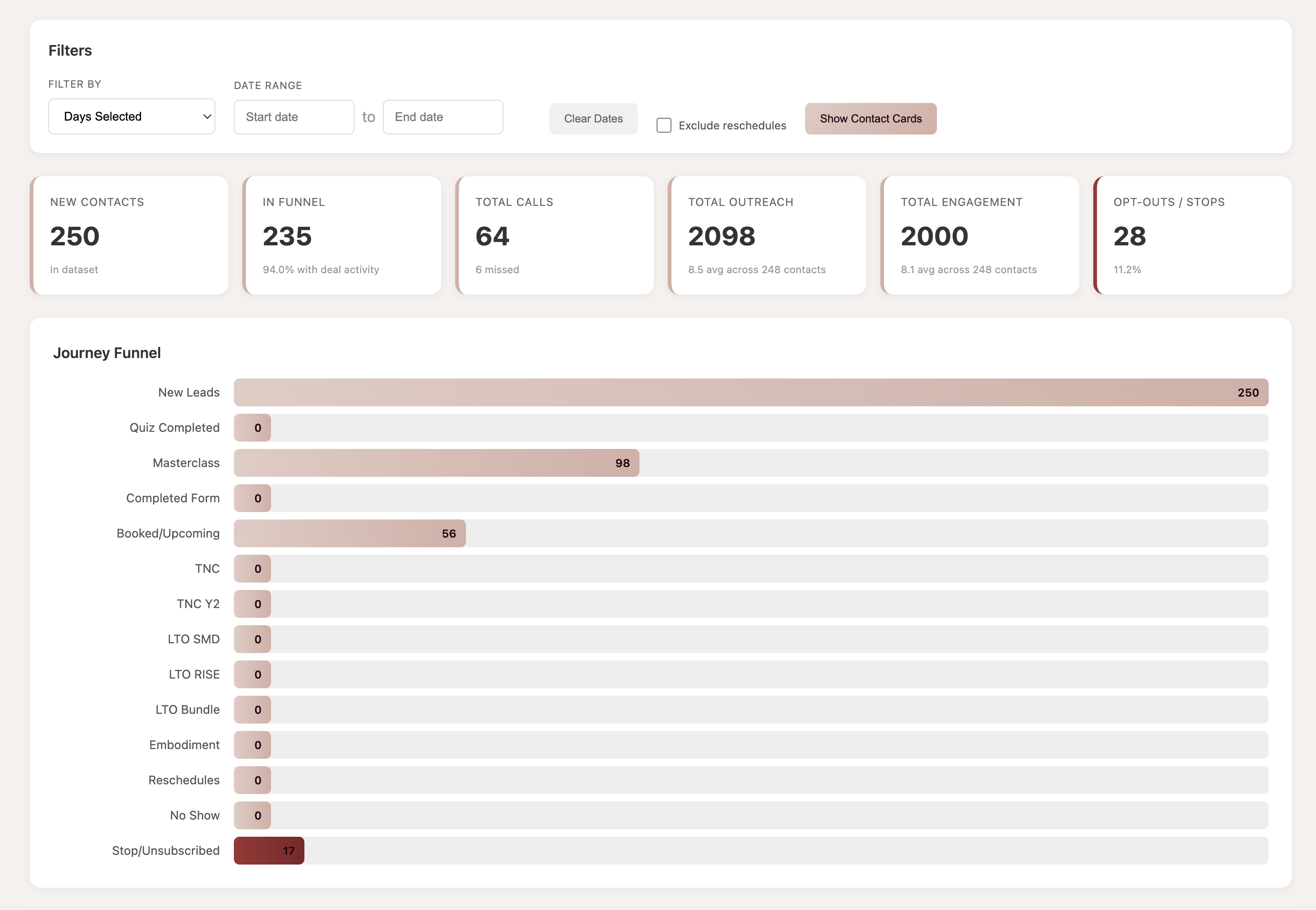
Weekly KPI cards and pipeline health metrics
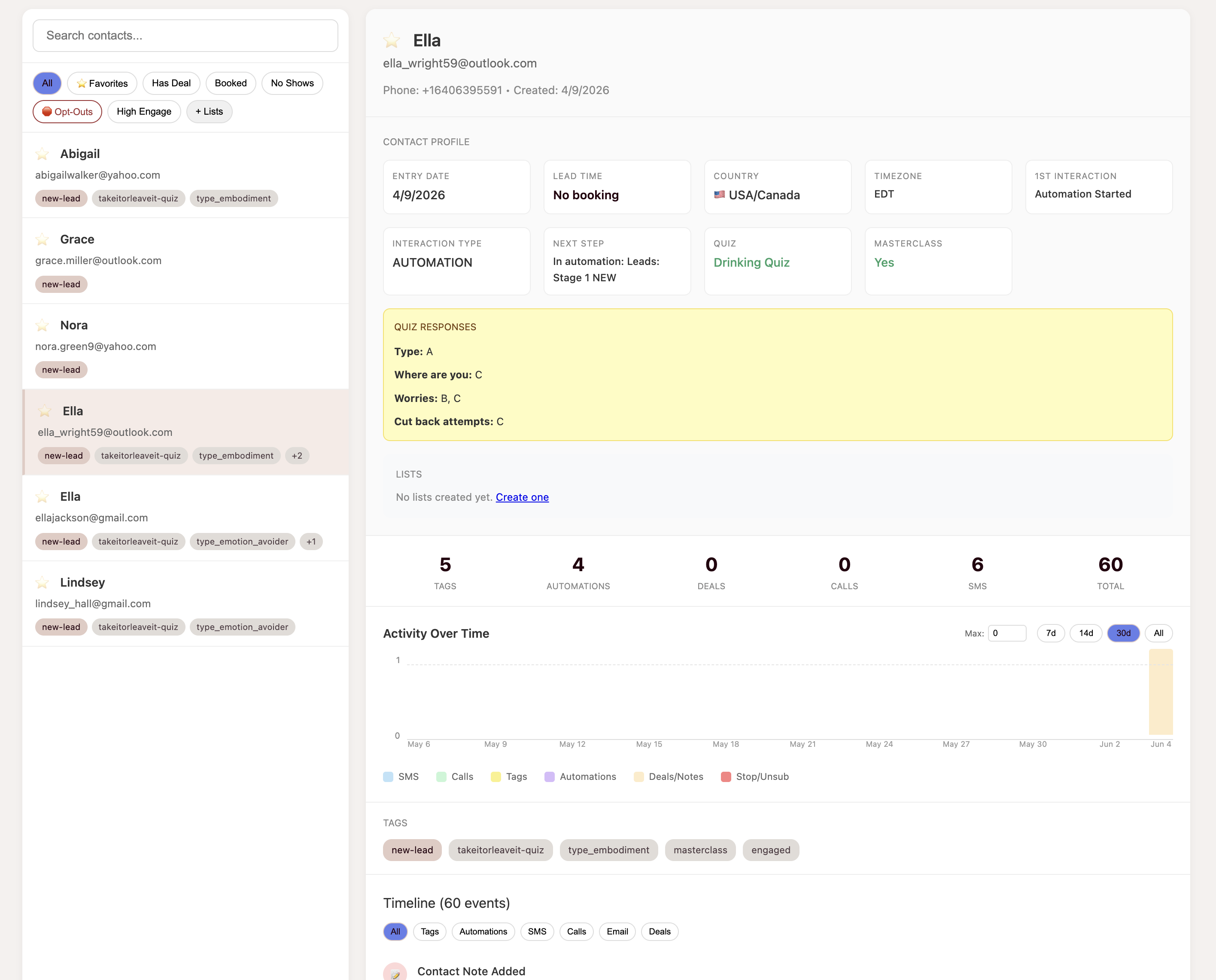
Unified contact timeline and engagement data
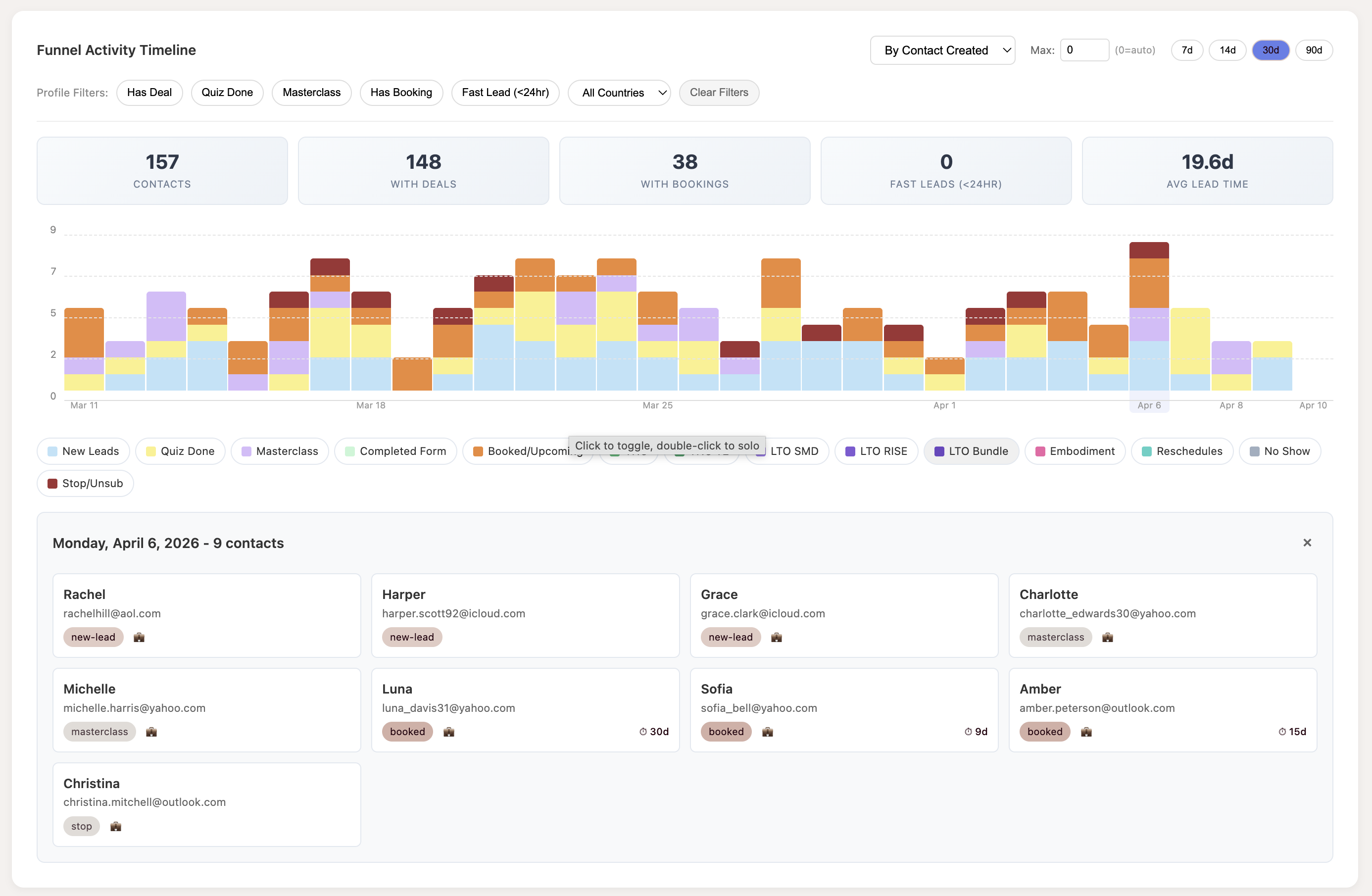
Stacked bar charts with drill-down by day
Three systems, one unified view
The hardest part wasn't building the UI — it was getting the data into one place. Prospect data lives across three separate systems, each with its own structure:
ActiveCampaign
ActiveCampaign holds contacts, custom fields (quiz responses, booking form answers, purchase history), tags, automations, deals, deal notes, email activity, and contact notes. The API is rate-limited to 5 requests per second, and enriching a single contact requires fetching automations, tags (current and historical), deals with notes, email engagement, custom field values, and contact logs — all from separate endpoints.
Booking System & JustCall
The booking system (PostgreSQL) holds SMS messages, booking state transitions, appointment data, and webhook events from JustCall. This is the source of truth for whether a prospect actually showed up to their call.
JustCall Data Extraction
JustCall data doesn't have a clean API integration. Incoming and outgoing SMS messages and call records are embedded in ActiveCampaign contact notes in a specific text format. The pipeline parses these notes, extracts structured data (date, phone number, message content, call direction), deduplicates by ID, and merges them into the unified timeline.
The export pipeline pulls from all three sources, builds a unified timeline per contact, and outputs a single dataset the dashboard can render. Rate limiting, pagination, retry logic, and deduplication handle the messiness of pulling from multiple APIs simultaneously. The booking automation engine writes directly to the same PostgreSQL database the dashboard reads from — so deal state changes, SMS events, and booking outcomes appear in the dashboard timeline in real time.
Built with
The booking engine runs on Railway with a PostgreSQL database. The dashboard is a single-page vanilla JS app — no framework overhead, instant load times. Both systems read from the same data layer.
What it actually moved
Live and evolving
Both systems are in production. The booking engine processes every discovery call automatically — deal cleanup, SMS confirmations, and post-call email sequences run without manual intervention. The dashboard is used weekly by the sales team for pipeline reviews and lead prioritization. An architectural rewrite of the dashboard is in progress to replace the static data export with a real-time database layer (Supabase with incremental sync), which will eliminate the manual export step and enable live updates as prospect data changes.
Want to talk about building something like this?
Sales automation, data pipelines, CRM integrations, and tools that let sales teams focus on selling instead of data entry. Get in touch.