Consolidating a coaching business into a single Flutter app
Replacing a fragmented private-podcast workflow with one cross-platform app, a custom admin SPA, and an automated onboarding pipeline — serving 500+ members, $2M+ processed, and 1,285+ episodes, built and operated by one engineer.
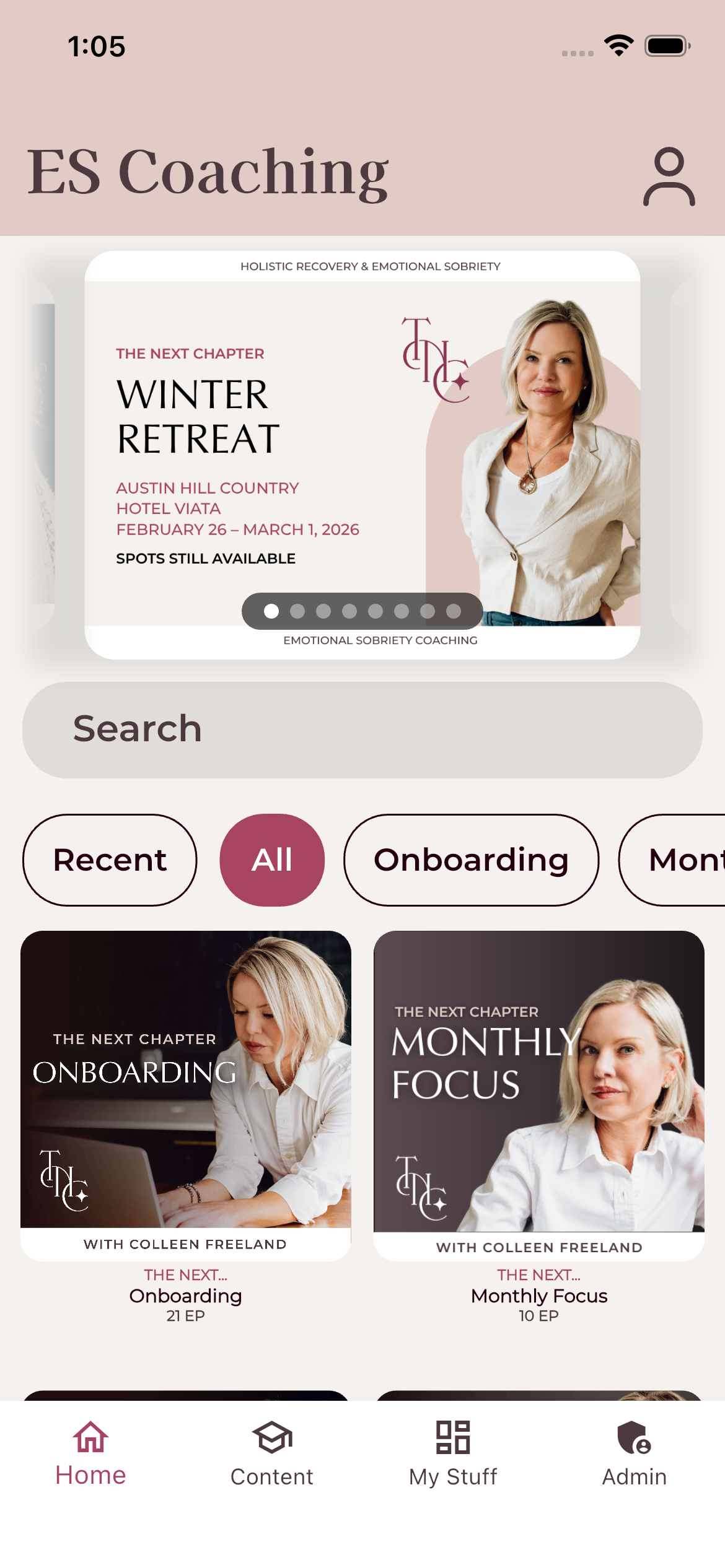
One app, the whole program
Members open the app and land on a curated home: an admin-controlled carousel for current campaigns, search across the entire content library, and the program's audio + video courses laid out in a Spotify-style browse view.
Built in Flutter from a single Dart codebase that ships to iOS, Android, and the web — backed by Firebase, with a custom admin SPA driving everything you see here.
A coaching program built on top of a private podcast feed
Audio content was delivered through Hello Audio as a private podcast, with supporting materials living in a patchwork of Canva pages and external links. It worked at small scale, but as the community grew the cracks turned into daily fires for the support team.
Invite links failed constantly and had to be manually re-routed. Listening data didn't track reliably. When new episodes dropped, a steady stream of clients would write in saying they hadn't received them — and the only fix was to reset their feed connection, which wiped any history we had on them. There was no way to offer "lifetime access up to a date"; clients either got everything forever or nothing at all. And every tech problem meant the client had to leave the experience entirely just to find a way to contact the team.
The program needed a real home: one place for audio, video, and supporting content; persistent member history that survived password resets and account changes; in-app support so problems could be reported in context; and a checkout flow that worked around Apple's App Store policies without breaking the conversion path.
Before
- Audio delivered via Hello Audio private podcast — invite links frequently failed and required manual routing
- Listening / engagement tracking was unreliable
- New episodes silently failed to reach many clients; the support team had to reset feed connections by hand
- Resetting a feed connection wiped the client's listening history entirely
- No way to offer lifetime content with a cutoff date — it was all-or-nothing access
- Supporting content scattered across Canva pages with links to half a dozen external sites
- Tech problems forced clients to leave the experience just to find a way to contact the team
- Account / password issues meant losing all member history with no way to recover it
After
- All audio and video lives in one Flutter app — no more scattered podcast feeds or Canva link hubs
- "Lifetime up to a date" content windows: a client can keep everything they had access to without auto-receiving new episodes
- Persistent member history that survives password resets, account recovery, and email changes
- In-app support reporting — clients flag issues without ever leaving the experience
- Stripe and Affirm checkouts hosted outside the app to sidestep Apple's 30% fee, with auto-provisioning that creates new accounts or upgrades existing ones in real time
- Seamless audio → video transitions inside a single player, no app-switching required
- Whisper-powered transcripts indexed across the entire back catalog
- Engagement dashboards the coaching team actually uses to see who's showing up
A tour of the stack
A single Dart codebase ships to iOS, Android, and the web. A token-authenticated admin SPA gives the internal team direct control without ever touching the database. Everything sits on Firebase — Auth, Firestore, Cloud Functions, Storage — with a small set of external services handling search, transcription, real-time video, and webhook automation.
Flutter Mobile
iOS · Android · one Dart codebase- Audio + video player
- Search · Content · My Stuff
- Community chat · Video calls
- Workbooks · Transcripts
- Email auth · role-aware UI
- FCM push notifications
Flutter Web
Spotify-style layout- Same Dart codebase
- In-browser audio + video
- Sidebar: My Stuff hub
- Top nav: Home · Content · Profile
- Hosted on Firebase Hosting
Public Share Links
/share/{shareId}- No login required
- Admin-generated links
- Honors expiresAt
- Reads public_shares only
Admin SPA
Token-authenticated · 11 modules- Users · Episodes · Bulk ops
- Carousel · Monthly Focus
- Workbooks · App viewership
- Auth logs · Diagnostics
- Calls Cloud Functions only
Firebase Auth
Identity · custom claims- Email / password
- Custom claims: roles · feeds · windows
- gateSignUp pre-approval
- syncUserClaimsHttp
- Source of truth for active users
Cloud Firestore
~20 collections · live SDK- Feeds / Seasons / Episodes
- Users + memberships
- Favorites · history · ratings
- discussion_threads · video_calls
- public_shares · carousel
- adminLogs · authErrorLogs
Cloud Functions v2
Node 20 · TypeScript · ~30 endpoints- User & Auth — invite, gate, claims
- Admin APIs — episodes, users, carousel
- Triggers — transcribe, counters, ratings
- Media — Whisper, Agora, Algolia keys
- Webhooks — Zapier integrations
- Some content produced by an automated audio pipeline
Firebase Storage
Media + transcripts- audio/ video/ media
- transcripts/{id}/full.json
- carousel · workbook PDFs
- Streamed directly to clients
Algolia — Search
Per-user scoped keys- Per-user scoped API keys
- Filtered by roles + feeds
- Drives Home / Search
OpenAI Whisper
Auto-transcription pipeline- Compress / chunk large files
- 12-second segments for UI
- Powers transcript player
Agora RTC — Video
Function-minted tokens- Function-minted RTC tokens
- Channel = video_calls/{id}
- ~1 hour token TTL
Zapier — Onboarding Orchestration
PayPal / Stripe / Affirm → account- Updates ActiveCampaign contact
- Sends client contract for signature
- On signature: invites to Discord
- Triggers app account provisioning
- Postmark delivers AC onboarding email
- JustCall SMS for optional credential delivery
- Shared-secret auth header
Built for the way the community actually works
Checkout to Active Member, Automated
PayPal, Stripe, and Affirm checkouts live on the website to sidestep Apple's 30% fee. A successful payment fires a Zap that updates the ActiveCampaign contact and sends a client contract for signature. Once the privacy agreement is signed, the member is invited to Discord, an app account is provisioned, and an onboarding email goes out via Postmark with their login + Discord link — JustCall SMS available as an optional credential channel.
Role-Based Membership Tiers
Free, paid, and high-tier coaching levels each unlock different content libraries, calls, and community spaces. Tiers are enforced consistently across mobile, web, and the admin portal.
Admin Portal & Engagement Insights
A purpose-built back office the non-technical team uses to manage members, publish episodes, and trigger automations without ever touching Firebase. Built in are per-member listen history, retention curves, and content performance dashboards — so coaches can see exactly who's engaging and where the program is landing or losing people.
Whisper-Powered Interactive Transcripts
New audio uploads run through an OpenAI Whisper pipeline that diarizes, timestamps, and indexes them — reaching 99.8% coverage of the back catalog with zero manual transcription. The output drives a full-screen player where listeners can search any episode by phrase, tap to jump to the exact second, and follow along as the audio plays.
Client Support
- In-app issue reportingMembers flag tech issues from inside the app where the problem is happening. The team gets full context — user, device, current screen — without the customer hunting down a contact form.
- Lifetime content with a cutoffMembers can lock in lifetime access to everything they've already paid for without automatically receiving new episodes — cutoffs are set per member and enforced at the content layer.
Some content in this app is produced by an automated pipeline I built — it records, transcribes, segments, and publishes coaching calls without human intervention.
See how the pipeline worksHow the hard parts actually got solved
Search was leaking content across membership tiers
Any authenticated user could search the full episode catalog regardless of their role. A free-tier member could find paid content, play it, and it would show up in their listening history — meaning even after fixing search, I had history entries exposing content they were never supposed to access.
The root issue wasn't a missing check — it was structural. The Algolia index treated every episode the same, and visibility was only enforced client-side, which meant anyone inspecting a network request or just typing the right keyword could reach content outside their tier. Fixing search alone wasn't enough, because the damage had already flowed downstream into user history.
I restructured visibility tagging across three layers — feeds, episodes, and user records — so that role-based access was consistent and enforceable at every level. Then I dug into Algolia's secured API key system and built a Cloud Function that mints scoped search keys per user, so each member's search index physically cannot return results outside their role. On the history side, I rewrote the history queries to filter against the user's current permissions, so even if a member had somehow played something they shouldn't have, it wouldn't surface in their feed going forward.
Search went from a shared index with client-side filtering — breakable by anyone with browser dev tools — to server-scoped keys with backend-enforced visibility across search, playback, and history. No member can see, play, or retain evidence of another tier's content, even if a future bug lets something slip through at one layer.
Rebuilding the transcript viewer twice
The first version of the transcript viewer dumped the entire transcript as a single block of text beneath the player. It didn't follow along with playback, it wasn't navigable, and once I had 1,200+ episodes with transcripts, it was clear that a wall of text wasn't useful to anyone.
The first problem was upstream. The transcription pipeline originally produced one continuous transcript per episode — no segments, no timestamps you could jump to. To make a tap-to-navigate viewer, I had to go back and rebuild the processor itself to output discrete 12-second segments, each with its own start time. That meant reprocessing the back catalog, not just changing the frontend.
The second problem was the viewer itself. Once I had segmented transcripts and built a player that highlighted the active segment, the highlight would drift off-screen during playback. The user would be listening, and the active segment would scroll out of view — so you'd have a "follow along" feature that didn't actually follow along. I set scroll parameters to keep the active segment locked within a target zone in the viewport and adjusted them through testing until the behavior felt right: the viewer tracks playback smoothly without jumping around or losing its place.
The transcript viewer went from a static text dump to a synchronized, tappable, searchable player that covers 99.8% of the back catalog. But it took two rebuilds to get there — one to fix the data, one to fix the experience — because I didn't know what the feature actually needed to be until the first version showed us what was missing.
Bulk operations broke 80 episodes and created the change log
I built a bulk move tool in the admin terminal so the coaching team could reorganize content — move episodes between feeds, shift entire seasons, hide or delete batches at once. The first time I used it on real data, it broke two feeds and roughly 80 episodes.
The issue was stale references. When episodes moved to a new feed or season, the old location references didn't update cleanly — some went null, others pointed to locations that no longer existed. The episodes effectively fell into a void. They weren't deleted, but they weren't visible in any feed, and the data that linked them to their original context — season assignments, ordering, feed metadata — was gone. The only way to recover them was manual database work, going through Firestore document by document to reconstruct where each episode belonged and restore the nulled fields.
After recovering the data, I went back to the drawing board on how bulk operations handle relational data. Moves now update all references atomically and validate that no episode is left orphaned before committing the operation. But the bigger lesson was that I had no way to know what had happened or when. So I built the admin change log — every bulk operation now records what moved, where it came from, where it went, and who triggered it. If something breaks again, I can audit the exact operation and recover from the log instead of manually reconstructing state from the database.
Two feeds and 80 episodes taught me that building the tool isn't enough — you have to build the audit trail at the same time, not after the first disaster.
When the automation doesn't catch them
Account provisioning was fully automated through Zapier: a new customer pays through Stripe or Affirm, the webhook fires, and a Cloud Function creates their account, assigns their role and access dates, and sends their credentials. Zero manual steps. It worked well — until it didn't.
Some customers came through paths Zapier wasn't watching. Payment plans with custom checkout flows, manual sales handled directly by the team — these would close a deal and then have no way to actually give the customer an account. The client services rep would have to come to me to manually provision in the database, which defeated the purpose of automating it in the first place.
I built a provisioning tool in the admin terminal where the team can create an account by entering a name, email, role, and start/end dates. The tool creates the Firebase Auth account, sets custom claims, writes the Firestore user document, and generates a temporary password to share with the new member. But the generated password was 12 random characters — functional for security, terrible for a first-time user trying to get into an app they just paid for. So I added a first-login prompt in the app that requires new users to set their own password on first sign-in, making the handoff seamless regardless of how the account was created.
The automated path still handles the majority of signups. But the manual provisioning tool means the team can handle every edge case — custom deals, gifted accounts, payment channels I haven't integrated yet — without waiting on an engineer or touching the database. The system is designed for the happy path but actually works for the messy one too.
What it actually moved
The platform isn't a demo — it runs the business. Real members use the app every day, real money flows through Stripe, and the team's daily operations now happen inside the admin portal instead of a stack of Google Sheets.
In active development
The platform is live and getting weekly updates. The biggest in-flight initiative is moving the program's group coaching calls off Discord and into the app itself — so the entire member experience, from onboarding through live coaching, finally lives in one place.
In-App Coaching Calls
Migrating live group coaching from Discord to native in-app video powered by Agora RTC. Once shipped, members will join calls directly from the same app where they listen, watch, and track their progress — no Discord account, no context switching.
One App, End-to-End
In-app calls are the last external dependency standing between the program and a fully unified experience. After this ships, the entire member journey — checkout, onboarding, audio, video, transcripts, community, live coaching — happens in a single Flutter app.
Continuous Updates
Weekly releases driven by real member feedback and the coaching team's day-to-day operational needs. The admin portal gets new modules as the team's workflows evolve, and the player keeps getting iterated on as members tell us what they actually use.
A look at the live experience
Real screens from production. Every one of these is the same Flutter codebase running against the Firebase backend described above — no mockups, no marketing renders.
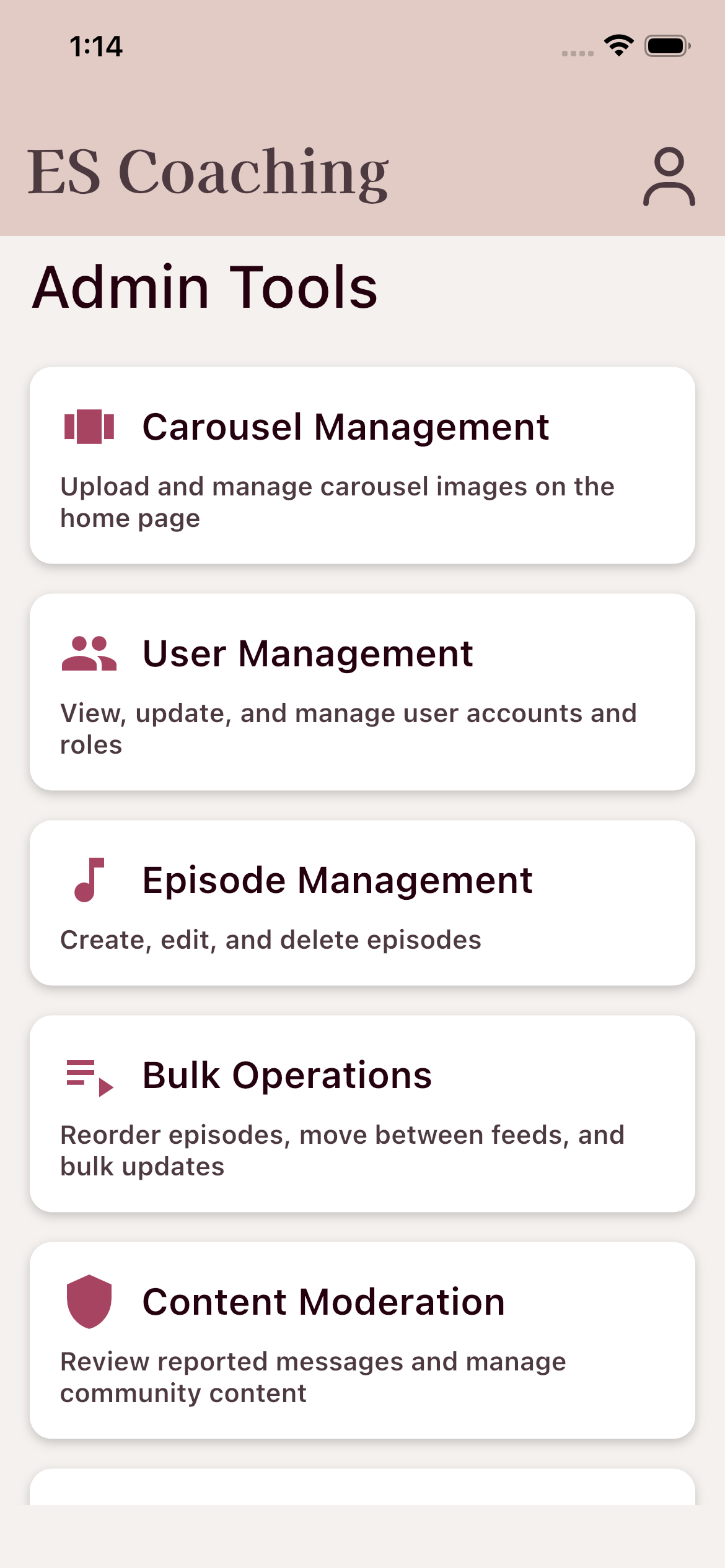
The non-technical team's daily workspace: carousel, user management, episode CRUD, bulk operations, content moderation, and more — all driven from inside the same app.
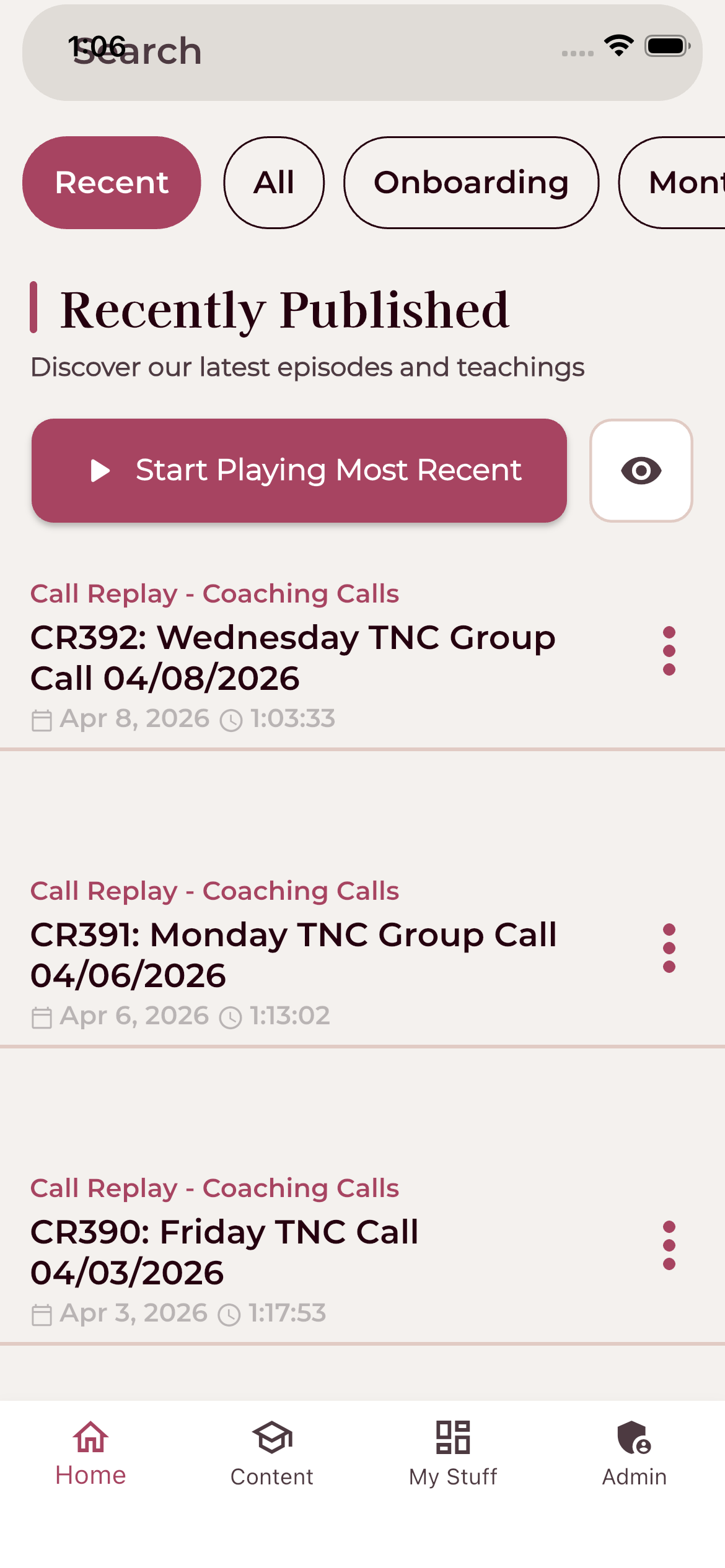
Live coaching call replays auto-published from the admin portal — replacing the old Discord-recording-and-link-emailing workflow.
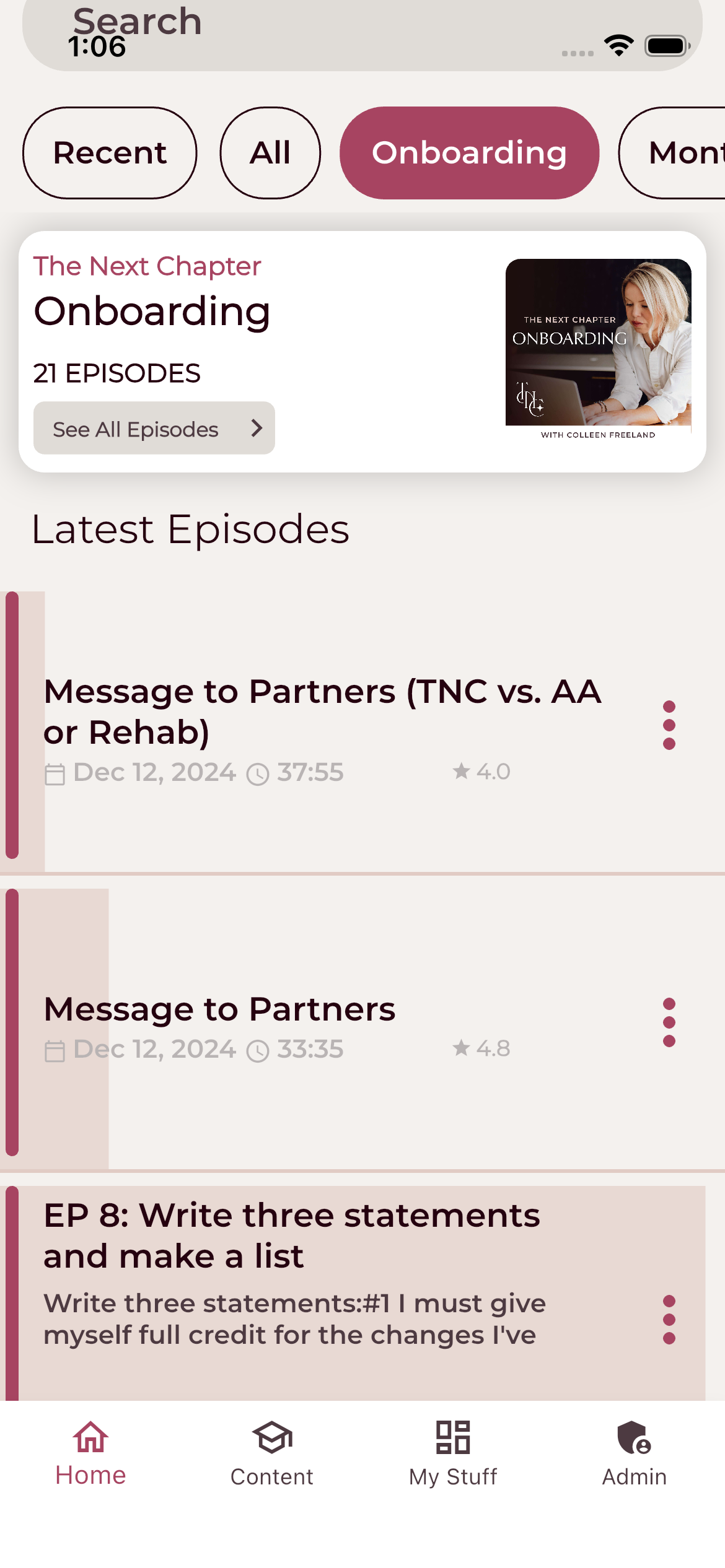
Episodes are organized into named feeds, sortable, and rated by members — feeding the engagement dashboards on the back end.
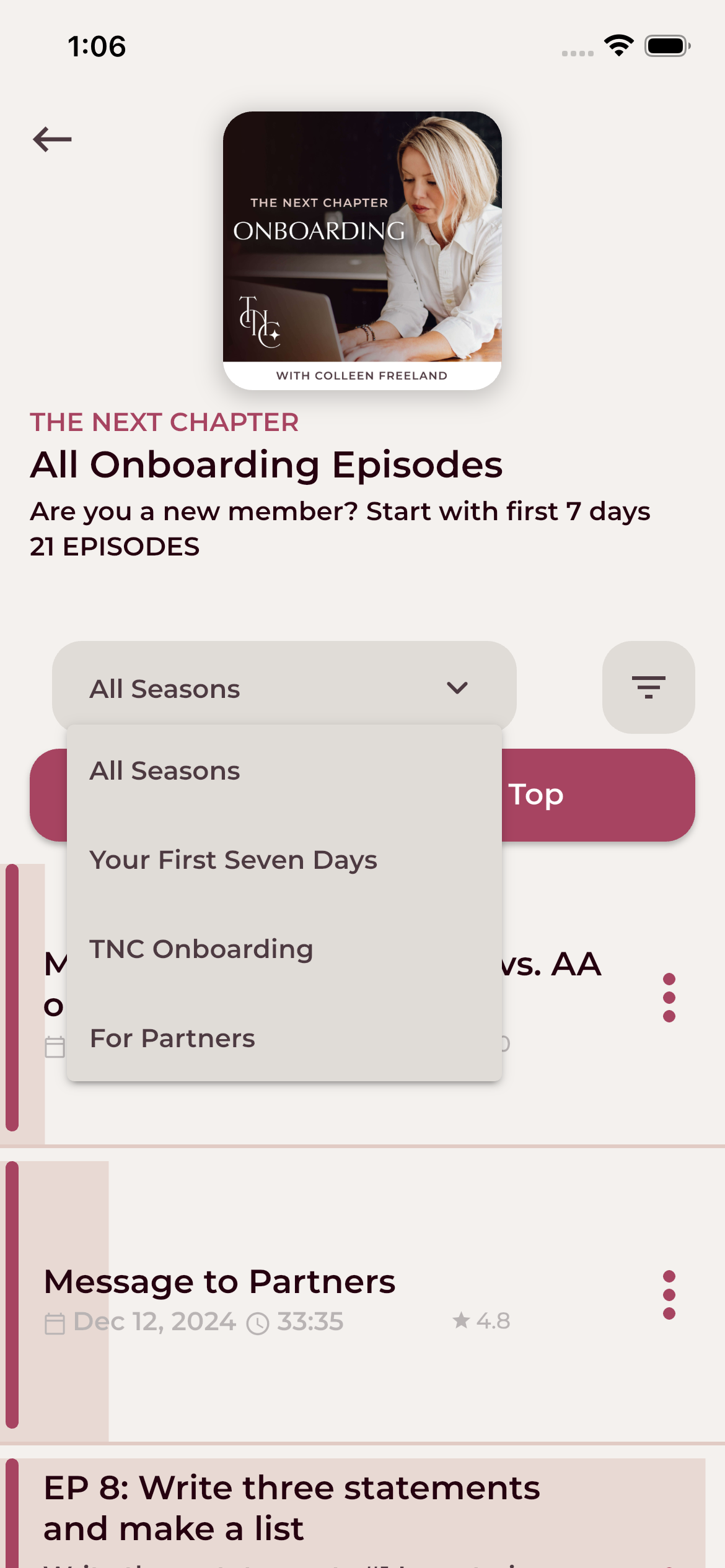
Each feed can be split into seasons or sub-tracks — like "Your First Seven Days," "TNC Onboarding," and "For Partners" — so different member journeys stay clean.
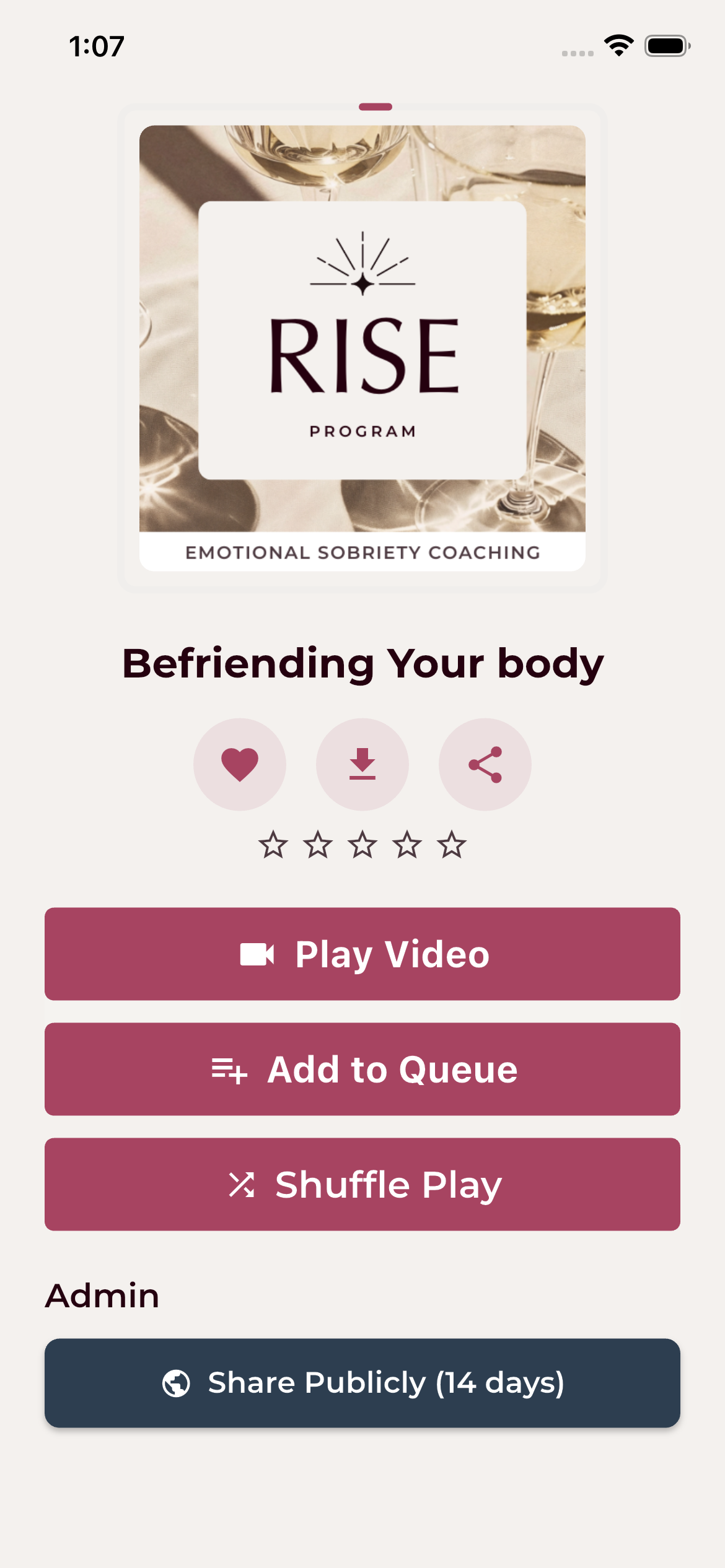
A single episode page handles audio or video content. Admins can mint a 14-day public share link straight from the same screen.
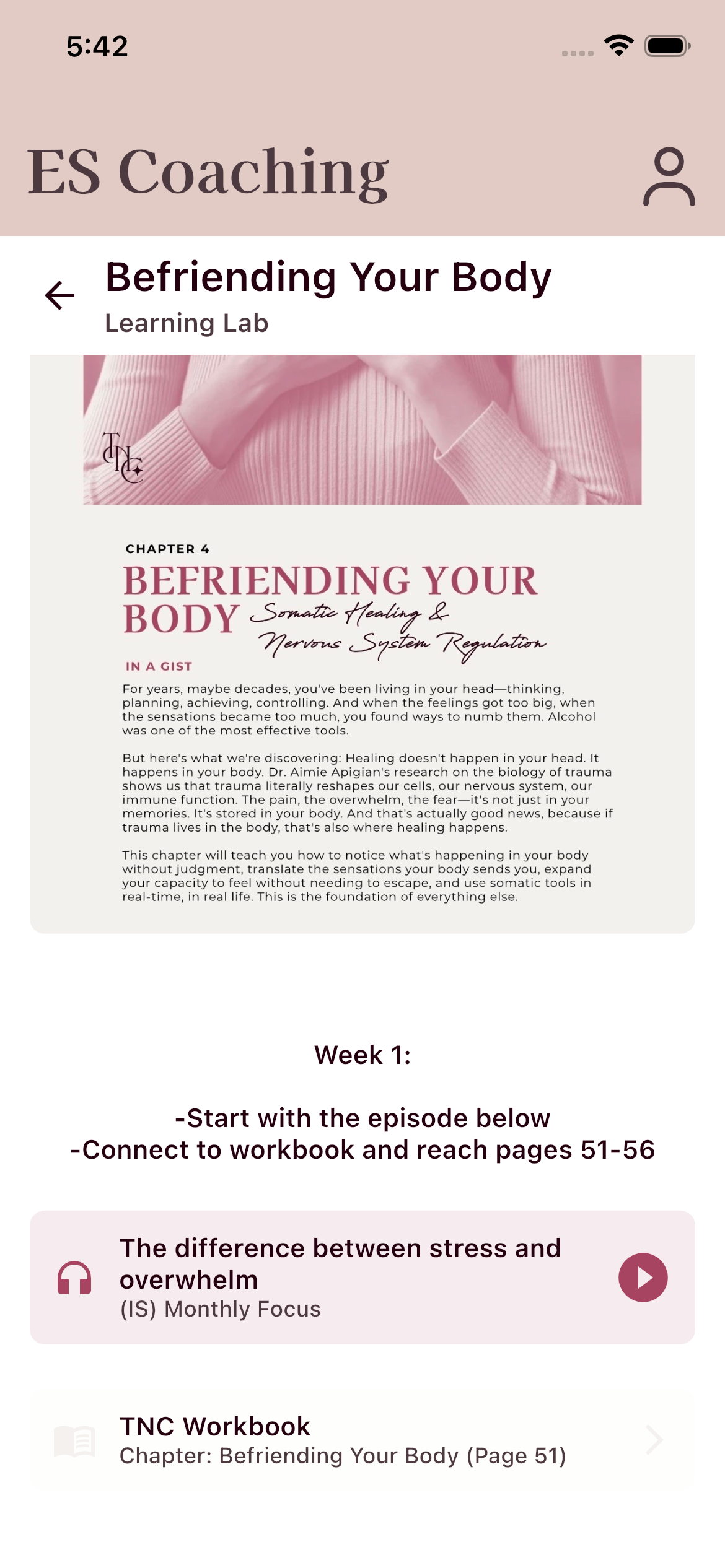
Lessons can combine imagery, written teaching, embedded episode players, and direct links to specific workbook pages — so members move between teaching, audio, and exercises without ever leaving the module.
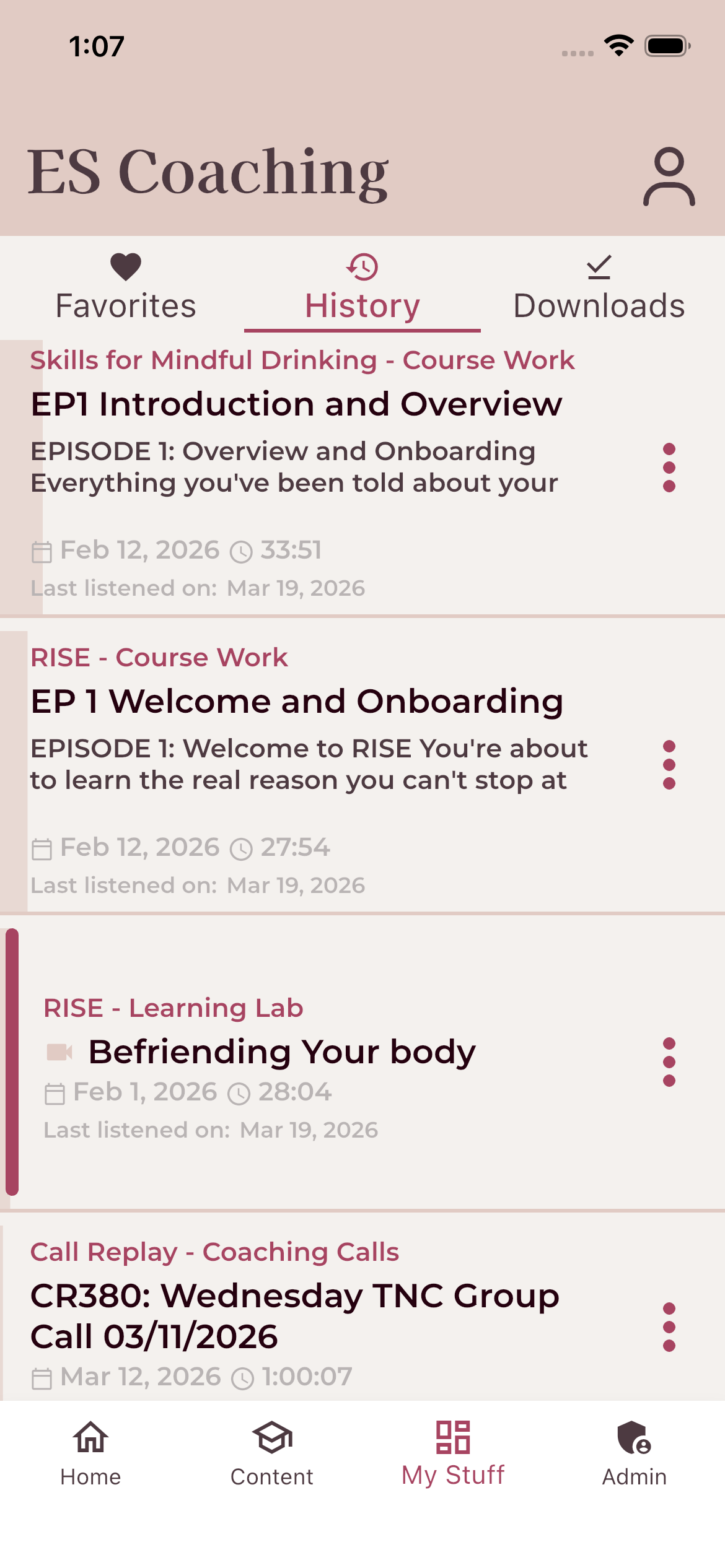
Cross-program listen history that survives password resets and account recovery — the problem that broke under the old private-podcast model.
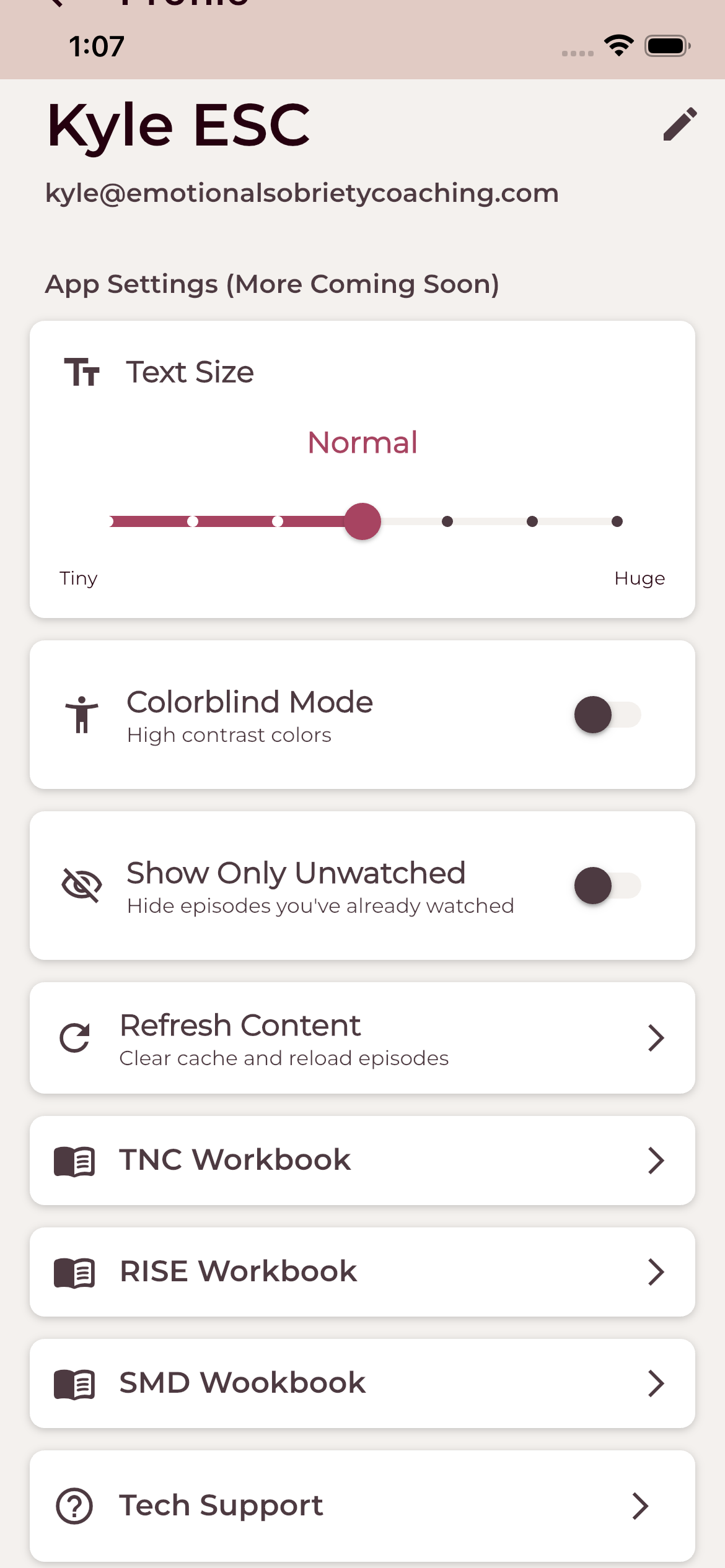
Text size, colorblind mode, "show only unwatched," workbook links, and in-app Tech Support — so members never have to leave the app to get help.
Built with
Chosen for shipping speed, operational maturity, and the ability for one engineer to maintain the whole stack without it becoming a second full-time job.
Want to see it in action?
Try the live demo of the ESC app, or get in touch about building something similar for your community or business.